Agent Harness Engineering: A Production-Grade Framework for Autonomous AI Agents
Building an AI agent demo is easy. You wire an LLM to a few tools, run it in a notebook, and watch it reason its way through a task. It feels like magic. But the moment you try to move that agent into a production environment, everything falls apart. The agent hallucinates actions that corrupt your database. It leaks PII in its responses. It calls a destructive API without asking anyone. It fails silently at 2 AM, and you only find out when a customer complains. There is no trace of what went wrong, no way to replay the decision chain, and no mechanism to prevent the same failure from happening again.
The missing piece is not a better model. It is engineering discipline around the model. The same way we do not deploy a raw database connection without connection pooling, retries, and monitoring, we should not deploy a raw LLM agent without guardrails, verification, memory management, and observability. I call this layer Agent Harness Engineering, and I built a production-grade Python framework to demonstrate what it looks like in practice.
What is Agent Harness Engineering?
Most agent frameworks today focus on the happy path: define tools, write a system prompt, and let the LLM figure out the rest. This works for demos but ignores the entire category of problems that emerge in production:
- Safety: What happens when a user tries prompt injection? What if the LLM generates toxic or PII-laden output?
- Reliability: What if the LLM produces a low-confidence response? Who verifies the output before it reaches the user?
- Accountability: What if the agent wants to execute a high-stakes action like scheduling emergency maintenance or deleting a record? Should it just do it?
- Memory: Does the agent remember what happened in previous conversations? Can it retrieve domain knowledge to ground its responses?
- Observability: Can you trace every decision the agent made, measure its cost, and evaluate its output quality at scale?
Agent Harness Engineering is the practice of wrapping an autonomous agent in a structured pipeline that addresses all of these concerns. The agent itself, the LLM reasoning over tools, is just one node in a larger graph. Around it, you build input validation, context retrieval, output safety checks, self-critique verification, human approval gates, and full-stack tracing.
Architecture Overview
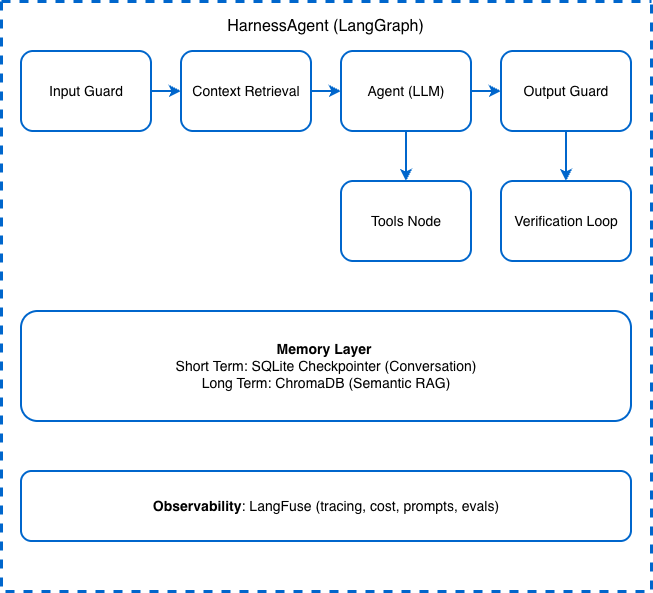
The framework is built on LangGraph, which gives us a stateful, graph-based execution model where each concern maps to a distinct node:
The execution flow is linear with conditional branches: every user message passes through the Input Guard, retrieves relevant context from long-term memory, goes to the LLM Agent node, optionally invokes tools (with human approval if needed), passes through the Output Guard, and finally enters a Verification Loop that can either approve the response or retry the generation. The Memory Layer and Observability Layer sit beneath the entire pipeline, available to every node.
Here is how the graph is constructed in code:
def _build_graph(self) -> Any:
    workflow = StateGraph(AgentState)

    # Add nodes
    workflow.add_node("input_guard", self._input_guard_node)
    workflow.add_node("retrieve_context", self._retrieve_context_node)
    workflow.add_node("agent", self._agent_node)
    workflow.add_node("approval_gate", self._approval_gate_node)
    workflow.add_node("tools", self._create_tool_node())
    workflow.add_node("output_guard", self._output_guard_node)
    workflow.add_node("verification", self._verification_node)

    # Set entry point
    workflow.set_entry_point("input_guard")

    # Define edges
    workflow.add_edge("input_guard", "retrieve_context")
    workflow.add_edge("retrieve_context", "agent")

    # Conditional: after agent, either call tools or go to output guard
    workflow.add_conditional_edges(
        "agent",
        self._should_use_tools,
        {"approval_gate": "approval_gate", "output_guard": "output_guard"},
    )

    # After approval gate, either proceed to tools or block
    workflow.add_conditional_edges(
        "approval_gate",
        self._approval_decision,
        {"tools": "tools", "output_guard": "output_guard"},
    )

    workflow.add_edge("tools", "agent")
    workflow.add_edge("output_guard", "verification")

    # After verification, either retry or finish
    workflow.add_conditional_edges(
        "verification",
        self._should_retry,
        {"retry": "agent", "end": END},
    )

    return workflow.compile(checkpointer=self.short_term_memory.saver)
Every node is a dedicated responsibility. No single function tries to do everything. This is the core principle of harness engineering: decompose the agent lifecycle into independently testable, independently configurable stages.
Tool Orchestration
Tools are the agent’s hands. In production, you need more than just a Python function with a docstring. You need validated inputs, execution logging, and a registry that supports dynamic tool discovery and approval gates.
The framework defines a HarnessTool abstract base class that enforces Pydantic-validated inputs:
class ToolInput(BaseModel):
    """Base schema for tool inputs. Subclass this for each tool."""
    pass


class HarnessTool(ABC):
    name: str = "base_tool"
    description: str = "A base harness tool."
    input_schema: Type[ToolInput] = ToolInput
    requires_approval: bool = False

    @abstractmethod
    def execute(self, **kwargs: Any) -> str:
        ...

    def run(self, **kwargs: Any) -> str:
        logger.info("Executing tool '%s' with inputs: %s", self.name, kwargs)
        self._call_count += 1
        validated = self.input_schema(**kwargs)
        result = self.execute(**validated.model_dump())
        return result

    def to_langchain_tool(self) -> StructuredTool:
        return StructuredTool.from_function(
            func=self.run,
            name=self.name,
            description=self.description,
            args_schema=self.input_schema,
        )
Every tool subclasses HarnessTool, defines its own ToolInput schema, and implements execute(). The run() method handles validation and logging automatically. The requires_approval flag marks tools that should go through human-in-the-loop before execution, a critical feature for production agents that can schedule maintenance, send alerts, or modify system state.
The ToolRegistry provides a central catalog that supports runtime registration, lookup, and bulk conversion to LangChain tools:
class ToolRegistry:
    def register(self, tool: HarnessTool) -> None:
        self._tools[tool.name] = tool

    def to_langchain_tools(self) -> list[StructuredTool]:
        return [tool.to_langchain_tool() for tool in self._tools.values()]

    def get_tools_requiring_approval(self) -> list[HarnessTool]:
        return [t for t in self._tools.values() if t.requires_approval]
This design means adding a new tool to the agent is a matter of subclassing, implementing, and registering. No changes to the agent graph, no changes to the pipeline.
Multi-Provider LLM Support
Production systems cannot be locked to a single LLM vendor. The framework uses LiteLLM to provide a unified interface across 100+ models. You switch providers by changing an environment variable:
# OpenAI
LLM_PROVIDER=openai
OPENAI_API_KEY=sk-your-key

# Anthropic
LLM_PROVIDER=anthropic
ANTHROPIC_API_KEY=sk-ant-your-key

# Groq (fast inference)
LLM_PROVIDER=groq
GROQ_API_KEY=gsk_your-key

# Local Ollama
LLM_PROVIDER=ollama
OLLAMA_MODEL=llama3.1
The LLMProvider class reads the configuration and returns a LangChain-compatible chat model. The rest of the framework never touches provider-specific code. This is the same BYOK (Bring Your Own Key) pattern I have used in previous projects like the Scalable Distributed LangGraph system, and it continues to prove its value.
Memory: Short-Term and Long-Term
Memory management is one of the most underappreciated aspects of agent engineering. I wrote extensively about this in my post on persistent memory with Hindsight, and this framework implements both tiers natively.
Short-term memory is handled by a SQLite-backed LangGraph checkpointer. Every conversation turn is persisted, so the agent can resume a thread across sessions without losing context. The checkpointer is wired directly into the compiled graph via workflow.compile(checkpointer=self.short_term_memory.saver).
Long-term memory is semantic. The LongTermMemory class wraps ChromaDB to provide vector-based storage and retrieval:
class LongTermMemory:
    def store(self, text: str, metadata: Optional[dict] = None, doc_id: Optional[str] = None) -> str:
        doc_id = doc_id or str(uuid.uuid4())
        self.collection.upsert(documents=[text], metadatas=[metadata], ids=[doc_id])
        return doc_id

    def query(self, query_text: str, n_results: int = 5) -> list[dict]:
        results = self.collection.query(query_texts=[query_text], n_results=n_results)
        return [
            {"id": results["ids"][0][i], "document": results["documents"][0][i],
             "distance": results["distances"][0][i]}
            for i in range(len(results["ids"][0]))
        ]
The retrieve_context node in the agent graph automatically queries long-term memory before every LLM invocation, injecting relevant prior knowledge as a system message. Additionally, every successful conversation exchange is stored back into ChromaDB, so the agent’s knowledge base grows organically over time.
Input and Output Guardrails
Guardrails are the safety net that separates a demo from a production system. The framework implements a policy-based engine where each SafetyPolicy defines patterns to match and an action to take: BLOCK, WARN, or REDACT.
The InputGuard runs before the LLM sees any user input:
class InputGuard:
    def validate_and_sanitize(self, user_input: str) -> tuple[bool, str, list[PolicyViolation]]:
        is_safe, violations = self.check(user_input)
        if not is_safe:
            return False, user_input, violations
        sanitized = self.sanitize(user_input)
        return True, sanitized, violations
It checks for prompt injection patterns, PII (credit card numbers, SSNs, email addresses), and other policy violations. If a BLOCK violation is detected, the message never reaches the LLM. If a REDACT policy matches, the sensitive content is replaced with [REDACTED] before processing.
The OutputGuard applies the same policy engine to the LLM’s response. This catches cases where the model itself generates PII, toxic content, or responses that exceed length limits. If the output is unsafe, the guard replaces it with a safety message:
class OutputGuard:
    def validate_and_sanitize(self, output: str) -> tuple[bool, str, list[PolicyViolation]]:
        is_safe, violations = self.check(output)
        if not is_safe:
            blocked_reasons = [v.description for v in violations if v.action == PolicyAction.BLOCK]
            blocked_msg = (
                "I cannot provide this response due to safety policy violations: "
                + "; ".join(blocked_reasons)
            )
            return False, blocked_msg, violations
        sanitized = self.sanitize(output)
        return True, sanitized, violations
Both guards are Pydantic-based and fully configurable. You can define custom policies, adjust patterns, and toggle guards on or off per environment.
Verification Loops: Self-Critique and Confidence Gating
Even after passing the output guard, the agent’s response goes through a verification loop. This is where the framework uses the LLM to critique its own output, a pattern that catches logical errors, incomplete answers, and hallucinations that a pattern-matching guard cannot detect.
The self-critique prompt evaluates the response on four dimensions: accuracy, completeness, safety, and coherence:
SELF_CRITIQUE_PROMPT = """You are a verification agent. Your job is to review the following
AI-generated response and assess its quality.

Original user request: {user_request}
AI response to verify: {response}

Evaluate the response on these criteria:
1. **Accuracy**: Is the response factually correct and relevant?
2. **Completeness**: Does it fully address the user's request?
3. **Safety**: Does it contain any harmful, biased, or inappropriate content?
4. **Coherence**: Is it well-structured and easy to understand?

Respond in this exact format:
PASSED: true/false
CONFIDENCE: 0.0-1.0
REASON: <brief explanation>
"""
The VerificationLoop parses this structured response and applies confidence gating. If the confidence score falls below the configured threshold (default 0.7), the response is either retried with exponential backoff or flagged for human review:
async def verify_and_gate(self, response: str, user_request: str) -> tuple[VerificationResult, bool]:
    result = await self.self_critique(response, user_request)
    should_proceed = result.passed and result.confidence >= self.confidence_threshold
    return result, should_proceed
The retry mechanism is bounded. After three failed verification attempts, the agent stops retrying and delivers the best available response. This prevents infinite loops while still giving the agent multiple chances to produce quality output.
Human-in-the-Loop: Approval Gates for High-Stakes Actions
Some tool calls should never execute without human oversight. When the agent proposes an action on a tool marked with requires_approval=True, the execution graph routes through an approval gate node instead of proceeding directly to the tools node.
The approval gate creates a pending request that is exposed through the API:
async def _approval_gate_node(self, state: AgentState) -> dict:
    approval_tools = {t.name for t in self.tool_registry.get_tools_requiring_approval()}

    needs_approval = []
    for tc in last_message.tool_calls:
        if tc["name"] in approval_tools:
            if not self.human_in_loop.has_recent_approval(tc["name"]):
                needs_approval.append(tc)

    for tc in needs_approval:
        self.human_in_loop.create_request(
            action_type=tc["name"],
            description=f"Tool '{tc['name']}' requires human approval.",
            details=tc.get("args", {}),
            thread_id=self._current_thread_id,
        )

    return {"awaiting_human_approval": True}
The agent pauses, informs the user that approval is required, and waits. Once the operator approves (or rejects) via the API or the React dashboard, the agent resumes execution on the same thread with full context continuity. This is especially critical in scenarios like emergency maintenance scheduling, where an autonomous action could have real-world physical consequences.
Observability: LangFuse Tracing and LLM-as-a-Judge
You cannot improve what you cannot measure. The framework integrates LangFuse for end-to-end observability, providing tracing, cost tracking, prompt management, and automated evaluation.
The HarnessTracer class wraps the LangFuse SDK and provides three key capabilities:
1. Automatic Tracing: Every agent chat is wrapped in an observation context that captures all LLM calls, tool invocations, and decision points under a single trace grouped by session:
with self.tracer.observation_context(
    name="agent-chat",
    session_id=thread_id,
    input={"message": message, "thread_id": thread_id},
):
    result = await self._graph.ainvoke(input_state, config=config)
2. Prompt Management: System prompts are versioned in LangFuse. On every agent initialization, the current prompt is synced to the Langfuse prompt registry, so you have a full audit trail of which prompt version produced which outputs.
3. LLM-as-a-Judge Evaluations: The framework automatically registers evaluation rules in LangFuse that score every agent response on helpfulness, relevance, hallucination, and toxicity using a judge LLM. Scores appear on each trace within seconds and are aggregated in the LangFuse dashboard:
| Rule | Score Type | Description |
|---|---|---|
| Auto: Helpfulness | Numeric (0-1) | Does the response help the user? |
| Auto: Relevance | Numeric (0-1) | Is the response relevant to the query? |
| Auto: Hallucination | Numeric (0-1) | Does it contain fabricated facts? |
| Auto: Toxicity | Numeric (0-1) | Is the response toxic or harmful? |
You can also push custom scores programmatically:
agent.tracer.score_trace(
    name="helpfulness",
    value=0.95,
    comment="Response directly addressed the user's question with actionable steps.",
)
This combination of automatic and custom scoring gives you a continuous quality signal across your entire agent fleet.
The Smart Factory Demo
To demonstrate all of these capabilities working together, the framework ships with a Smart Factory IoT Monitor demo. It simulates a factory with 4 machines, each equipped with 4 sensors (temperature, vibration, pressure, humidity). An AI agent monitors the factory using the full harness pipeline:
- Reads sensor data: Queries live sensor values from the simulator
- Detects anomalies: Compares readings against normal and critical thresholds
- Sends alerts: Notifies operators of warnings and critical issues
- Schedules maintenance: Proposes preventive or corrective maintenance, with human approval required for emergencies
The demo includes a FastAPI backend exposing REST and WebSocket endpoints, and a React + Vite + TailwindCSS dashboard for real-time monitoring. The API surface covers the full agent lifecycle:
| Method | Endpoint | Description |
|---|---|---|
| POST | /api/chat |
Chat with the factory agent |
| POST | /api/monitor |
Trigger a monitoring cycle |
| GET | /api/sensors |
Current sensor readings |
| WS | /ws/sensors |
Live sensor data stream |
| GET | /api/alerts |
Active alerts |
| GET | /api/approvals |
Pending human approvals |
| POST | /api/approvals/{id} |
Approve or reject an action |
| GET | /api/memory |
Long-term memory stats |
| POST | /api/memory/search |
Semantic search over memory |
| GET | /api/threads |
List conversation threads |
The maintenance scheduling tool is marked with requires_approval=True, so when the agent detects a critical anomaly and proposes emergency maintenance, the action is routed through the approval gate. The operator sees the pending request in the dashboard, reviews the details, and approves or rejects it. Only then does the agent proceed.
Running the demo is straightforward:
# Start Redis and LangFuse
docker compose up -d

# Start the API server
uv run uvicorn demo.smart_factory.app:app --host 0.0.0.0 --port 8000 --reload

# Start the React dashboard
cd demo/smart_factory/frontend
npm install && npm run dev
Using the Framework in Your Own Projects
The harness is designed to be reusable beyond the demo. Here is a minimal example of building a custom agent with the framework:
import asyncio
from harness.core.config import HarnessConfig
from harness.core.agent import HarnessAgent
from harness.tools.base import HarnessTool, ToolInput
from harness.tools.registry import ToolRegistry


class GreetInput(ToolInput):
    name: str = "World"

class GreetTool(HarnessTool):
    name = "greet"
    description = "Greets someone by name."
    input_schema = GreetInput
    requires_approval = False

    def execute(self, name: str = "World") -> str:
        return f"Hello, {name}!"


async def main():
    config = HarnessConfig()
    registry = ToolRegistry()
    registry.register(GreetTool())

    agent = HarnessAgent(
        config=config,
        system_prompt="You are a helpful assistant with greeting capabilities.",
        tool_registry=registry,
    )
    await agent.initialize()

    response = await agent.chat("Say hello to Alice!")
    print(response)

    await agent.shutdown()

asyncio.run(main())
With that single HarnessAgent, you get input guardrails, output guardrails, self-critique verification, short-term conversation memory, long-term semantic memory, and LangFuse tracing, all without writing a single line of infrastructure code.
Key Takeaways
- The agent is not the product; the harness is. The LLM reasoning node is just one stage in a multi-stage pipeline. The guardrails, verification, memory, and observability layers are what make it production-worthy.
- Guardrails must be bidirectional. Validating inputs catches prompt injection and PII leakage before the LLM sees them. Validating outputs catches hallucinations and safety violations before the user sees them.
- Self-critique adds a meaningful quality layer. Having the LLM review its own output with structured evaluation criteria catches errors that pattern-matching alone cannot detect.
- Human-in-the-loop is not optional for high-stakes actions. Any tool that can modify real-world state should require explicit human approval. The approval gate pattern keeps the agent autonomous for safe actions while gating dangerous ones.
- Observability is a production requirement, not a nice-to-have. Full tracing, cost tracking, and automated LLM-as-a-Judge evaluations give you the feedback loop needed to improve agent quality continuously.
- Provider agnosticism protects your investment. Using LiteLLM to abstract across OpenAI, Anthropic, Groq, and Ollama means you can switch models without touching your application code.
You can download the complete source code from GitHub. The repository includes the full harness framework, the Smart Factory demo with a React dashboard, Docker Compose setup for Redis and LangFuse, and a comprehensive test suite. Please let me know if you liked this article or have any questions, feedback, or suggestions. You can connect with me on LinkedIn.