Mastering Context Engineering: The Architect's Guide to Scalable AI Agents
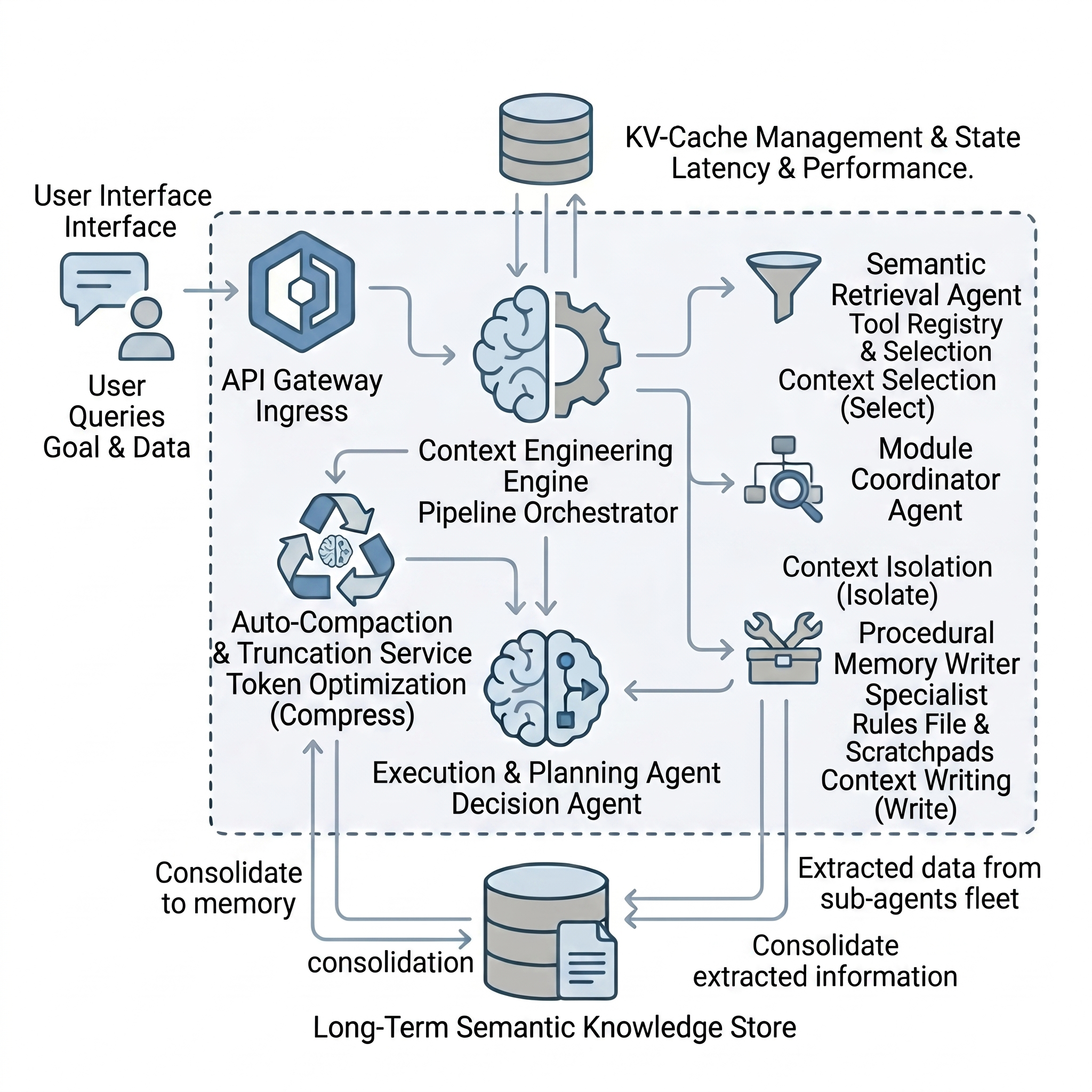
If you are building autonomous AI agents, you are likely familiar with the “step 15 cliff.” During the first few iterations, your agent operates flawlessly, it selects the correct tools, applies sound logic, and executes the plan. But as the task progresses, its performance degrades. It forgets initial instructions, hallucinates tool calls, and outputs increasingly poor results.
The natural inclination is to blame the underlying LLM. However, in my experience architecting multi-agent systems, the model is rarely the bottleneck. The actual point of failure is what the model is forced to process.
Structuring and controlling this information flow is known as context engineering. As enterprise adoption of AI shifts from static RAG pipelines to autonomous workflows, mastering context engineering is no longer optional, it is a foundational requirement.
Here is a breakdown of why agent memory fails, the four core strategies to manage it, and how to architect production grade context pipelines.
The Working Memory Bottleneck
Prompt engineering is sufficient for chatbots. You provide instructions, set a persona, and manage a brief back-and-forth. Autonomous agents, however, generate a continuous stream of actions-querying databases, executing code, and scraping web pages. Every output is appended to the model’s context window.
Think of the LLM as the CPU and the context window as its RAM. When the RAM maxes out, system performance collapses.
This leads to two well documented phenomena:
Context Rot: Model reasoning degrades steadily as the input length grows, even if you are technically well within the 100K or 200K token limit.
Lost in the Middle: Transformer models exhibit a U-shaped attention span. They accurately recall the beginning and end of a prompt, but crucial instructions buried in the middle of massive API payloads are effectively invisible.
To prevent this, we must actively engineer what resides in the context window.
The Four Pillars of Context Engineering
Managing agent memory effectively requires breaking down context operations into four distinct strategies: Write, Select, Compress, and Isolate.
1. Write (Externalizing Memory)
Agents suffer from amnesia when their context window is cleared or compacted. To prevent data loss, the agent must persist critical information externally.
- Scratchpads: Provide the agent with a dedicated tool to write down intermediate logic or progress markers.
- Procedural Memory: Load standing orders (like a CONVENTIONS.md file) at the beginning of a session to enforce architectural boundaries.
- State Tracking: Maintain a persistent, external ledger of completed tasks so the agent doesn’t lose its place in complex, multi step workflows.
2. Select (Just-in-Time Retrieval)
Never feed the model everything; give it only what is strictly necessary for the current operation.
If your system has 50 available tools, loading all 50 definitions upfront wastes thousands of tokens and confuses the model. Instead, utilize semantic search over your tool registry to dynamically retrieve only the 3 to 5 tools relevant to the immediate task.
3. Compress (Token Optimization)
Even with strict selection, the context window will eventually fill up with execution history. Compression techniques allow you to retain the signal while discarding the noise.
- Pre-execution: Chunk and summarize large payloads before they ever enter the context window.
- Rolling Summaries: Maintain verbatim logs for the last five interactions, but compress older history into a continuous summary.
- Post-execution Pruning: Once an agent has extracted the necessary data from a tool call (e.g., parsing a 10,000 token web page), delete the raw output from the context and replace it with a single line summary.
4. Isolate (Clean Context Windows)
Multi-agent systems thrive on isolation. If a single agent attempts to research a codebase, plan a feature, and write the code within the same thread, the leftover noise from the research phase will pollute the coding phase.
Instead, use sub-agents. The orchestrator delegates a subtask (like file traversal) to a specialized agent operating in a fresh, isolated context window. The sub-agent completes the messy work and returns a highly compressed summary to the orchestrator, keeping the main context pristine.
Anticipating and Mitigating Agent Failure Modes
When you fail to apply the four pillars, agents break down in predictable patterns:
Context Poisoning: A bad API response or flawed assumption enters the context. Because the agent iterates on its own history, the error compounds with every step. Fix: Aggressively prune deadend reasoning and validate external data before injection.
Context Distraction: The context grows so bloated that the agent stops synthesizing new plans and defaults to repeating recent behaviors. Fix: Enforce strict token limits through continuous summarization.
Context Confusion: Providing too many options (like dumping 40 tool schemas into the prompt) paralyzes the model, leading to hallucinated tool calls. Fix: Implement dynamic, phase specific tool management.
Context Clash: The agent receives contradictory information (e.g., system prompt vs. retrieved data) and exhibits erratic behavior. Fix: Enforce a strict hierarchy of authority using structured XML tags.
Architectural Considerations for Production
Finding the Right Prompt Altitude
Agent system prompts are architectural blueprints. If they are too vague, the agent cannot operate autonomously. If they are too rigid (relying on endless if/then conditions), they shatter on edge cases. The optimal altitude provides strong heuristics and few-shot examples, allowing the model to apply its own judgment within safe boundaries.
The KV-Cache Dilemma
While dynamically adding and removing tools saves context space, it can destroy your latency and unit economics.
Inference providers utilize KV-caching to avoid recomputing prompts. If the beginning of your prompt remains stable, the cache is reused, making the API call drastically faster and cheaper. If you constantly swap tool definitions at the top of the prompt, you invalidate this cache.
The enterprise solution is tool masking. Keep your tool definitions static at the top of the prompt to maintain cache stability, but update a lightweight “state” variable at the bottom that explicitly dictates which tools are currently authorized for use.
The Golden Rule: Frequent Intentional Compaction
Do not treat the context window as an infinite, appending text file. Treat it as a highly structured data pipeline.
Break complex workflows into phases. Allow a sub-agent to explore and research, outputting a dense markdown artifact. Then, deliberately close that session. Open a completely new context window containing only the problem statement and the compressed research artifact to begin the execution phase.
By proactively resetting the agent’s working memory at clear operational boundaries, you ensure maximum reasoning capability from the first step to the final output.
The core concepts discussed in this post are inspired by Context Engineering for AI Agents: Complete Course published on the Data Science Collective.