GenAI Observability with MLflow: From MLOps to LLMOps
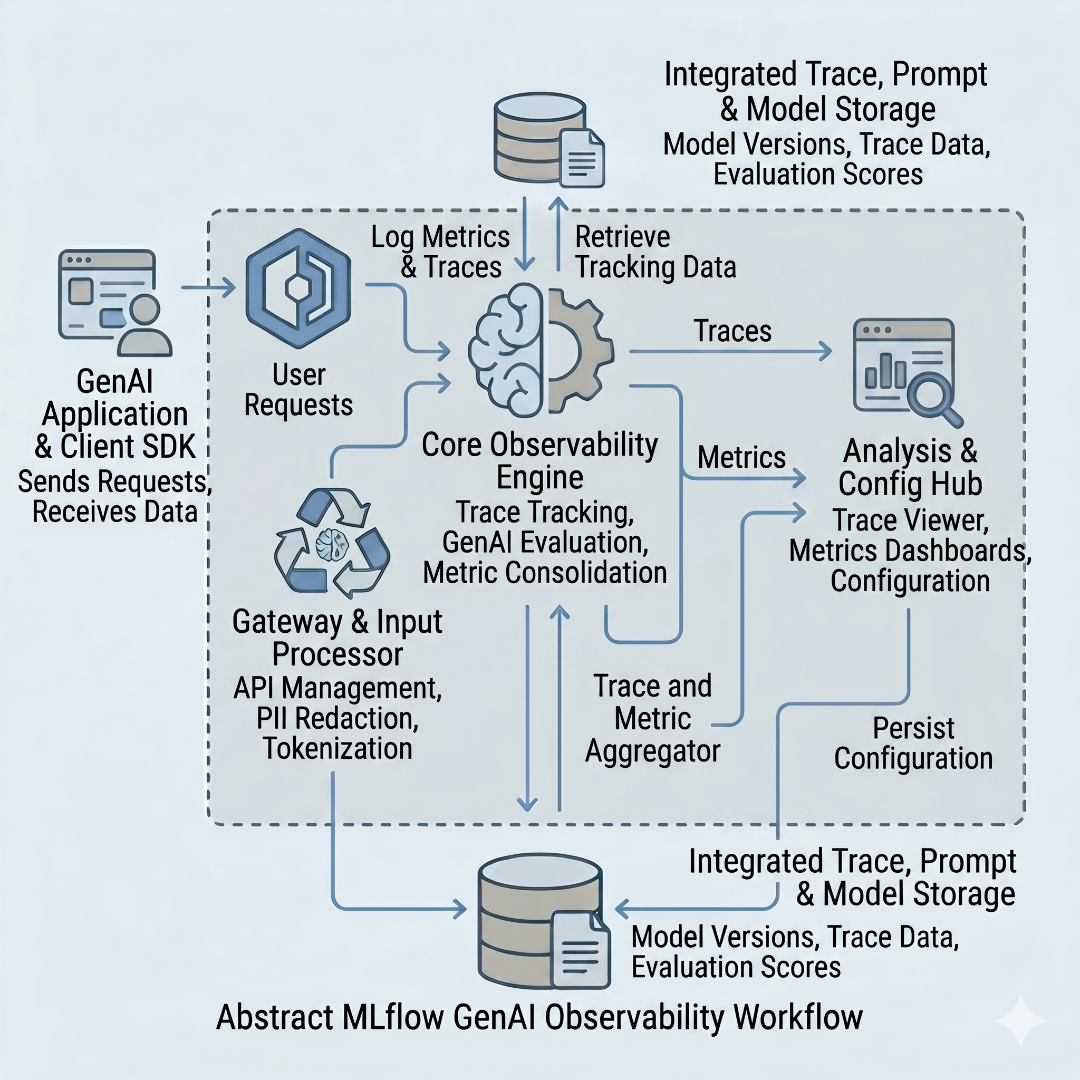
I have a long history with MLflow. Back in 2020, when I wrote about operationalizing ML model inferencing, MLflow Model Registry was a central component in the proposed architecture. The idea was straightforward: train your model in any framework, convert it to ONNX format, and store it in MLflow with proper version tracking so that inference environments could pull the right model at the right time. That architecture eliminated entire categories of MLOps complexity around packaging, containerization, and dependency management.
Over the years, MLflow became my go-to tool for experiment tracking, model versioning, and managing the machine learning lifecycle. It did one thing exceptionally well: it gave engineering teams a unified interface to track, reproduce, and deploy ML models regardless of the framework they were trained in.
But the world has moved on. We are now building systems powered by large language models, and the operational challenges look fundamentally different. The question I kept asking myself was whether MLflow could adapt to this new reality. Having spent time with its latest GenAI observability features, I can say with confidence that it has.
MLOps vs LLMOps: Why the Rules Changed
Before diving into MLflow’s new capabilities, it is worth understanding why traditional MLOps practices are insufficient for LLM-powered applications. The two disciplines share the same lineage, but they solve very different problems.
What MLOps handles well:
- Data versioning and lineage: Tracking which dataset version produced which model
- Experiment tracking: Logging hyperparameters, metrics, and artifacts across training runs
- Model registry: Versioning trained models with stage transitions (staging, production, archived)
- CI/CD pipelines: Automated retraining, validation, and deployment
- Reproducibility: Ensuring that a given commit, dataset, and configuration produce the same model
These concerns revolve around deterministic, measurable outputs. You train a model, you measure its accuracy on a holdout set, and you promote it to production if the numbers look right. The feedback loop is well understood.
What LLMOps demands differently:
- Prompt management: Prompts are the new “model weights.” They need versioning, A/B testing, and a registry just like trained models did
- Non-deterministic outputs: The same prompt can produce different outputs across invocations. Traditional accuracy metrics do not apply
- Tracing and observability: LLM applications involve chains of calls (retrieval, augmentation, generation, tool use). You need full trace visibility to debug failures
- Evaluation beyond metrics: Quality assessment requires LLM-as-a-Judge patterns, custom scoring functions, and human-in-the-loop review
- Cost and latency tracking: Every LLM call costs money and introduces latency. These operational metrics are first-class concerns
- Guardrails and safety: Output validation, toxicity checks, and hallucination detection are operational requirements, not afterthoughts
The fundamental shift is this: in MLOps, the artifact is the model and the evaluation is numerical. In LLMOps, the artifacts are prompts, chains, and agent configurations, and the evaluation is largely qualitative. You cannot unit-test a conversation the way you unit-test a classification model.
MLflow’s Evolution: From MLOps to LLMOps
What impressed me about MLflow’s approach is that it did not throw away its existing architecture to chase the GenAI trend. Instead, it extended its core abstractions to cover LLMOps concerns natively.
Here is how the mapping looks:
| MLOps Capability | MLflow Feature | LLMOps Equivalent | MLflow GenAI Feature |
|---|---|---|---|
| Experiment Tracking | mlflow.log_params(), mlflow.log_metrics() |
Trace Observability | mlflow.openai.autolog(), @mlflow.trace |
| Model Registry | mlflow.register_model() |
Prompt Registry | mlflow.genai.register_prompt() |
| Model Evaluation | mlflow.evaluate() with accuracy/F1 |
LLM Evaluation | mlflow.genai.evaluate() with scorers |
| Artifact Storage | Model artifacts in S3/GCS | Trace Storage | OpenTelemetry-compatible trace backend |
| Pipeline Tracking | Run lineage and parent runs | Session Tracking | mlflow.trace.user, mlflow.trace.session |
The continuity matters. Teams already using MLflow for traditional ML workloads do not need to adopt a completely new tool for their GenAI projects. The same server, the same UI, and the same mental model extend into the LLM domain.
Hands-On: GenAI Observability with MLflow
To demonstrate these capabilities end to end, I built a project that showcases MLflow’s tracing, evaluation, and prompt registry features through six progressive demos. The full source code is available on GitHub.
Architecture Overview
The project runs a production-like MLflow setup using Docker Compose with three services:
- PostgreSQL: Backend store for experiment metadata, runs, and trace data
- RustFS: S3-compatible object storage for artifacts (a lightweight alternative to MinIO)
- MLflow Server: The tracking server with artifact proxying enabled
On the application side, there is an abstract LLM provider layer that supports OpenAI, Groq, and Ollama, so the demos work with any of these backends without code changes.
def get_llm():
    provider = os.getenv("LLM_PROVIDER", "openai").lower()

    if provider == "openai":
        from langchain_openai import ChatOpenAI
        return ChatOpenAI(temperature=0, model="gpt-4.1-mini", api_key=os.getenv("OPENAI_API_KEY"))

    elif provider == "groq":
        from langchain_groq import ChatGroq
        return ChatGroq(temperature=0, model_name="llama3-8b-8192", api_key=os.getenv("GROQ_API_KEY"))

    elif provider == "ollama":
        from langchain_community.chat_models import ChatOllama
        return ChatOllama(temperature=0, model=os.getenv("OLLAMA_MODEL", "llama3"),
                          base_url=os.getenv("OLLAMA_BASE_URL", "http://localhost:11434"))
This abstraction keeps the observability code completely decoupled from the LLM provider choice.
Demo 1: Tracing Basics
The simplest way to get tracing in MLflow is through auto-instrumentation. A single call to mlflow.openai.autolog() automatically captures every LLM call, including input messages, output tokens, latency, and model parameters.
For more control, the @mlflow.trace decorator lets you create custom spans:
@mlflow.trace(span_type=SpanType.CHAIN)
def qa_agent(question: str) -> str:
    llm = get_llm()
    messages = [
        ("system", "You are a helpful assistant. Answer questions concisely and accurately."),
        ("user", question),
    ]
    response = llm.invoke(messages)
    return response.content
When you run this agent, MLflow records the entire call as a trace with a CHAIN span type. The MLflow UI shows the span hierarchy, input/output data, and timing information. This is the building block for all the other demos.
The demo also shows tool-call tracing where the agent invokes a weather tool before answering, producing nested spans that visualize the full decision path.
Demo 2: RAG Agent Tracing
Real-world LLM applications rarely involve a single LLM call. A RAG pipeline, for example, has distinct phases: retrieval, context formatting, and generation. MLflow tracing captures each phase as a nested span.
@mlflow.trace(span_type=SpanType.CHAIN)
def rag_agent(question: str) -> str:
    documents = search_documents(question, top_k=3)
    context = format_context(documents)
    answer = generate_answer(question, context)
    return answer
The retrieval and formatting functions are also decorated with @mlflow.trace(span_type=SpanType.RETRIEVER), producing a trace hierarchy that looks like:
rag_agent (CHAIN)
  -> search_documents (RETRIEVER)
  -> format_context (RETRIEVER)
  -> generate_answer (CHAIN)
     -> LLM call
This level of visibility is critical for debugging RAG pipelines. When an answer is wrong, you can immediately see whether the retriever returned irrelevant documents or whether the LLM ignored the provided context.
Demo 3: Multi-Turn Session Tracking
Conversational agents present a unique observability challenge: you need to correlate traces across multiple turns within the same session and across different users. MLflow handles this through trace metadata.
class MultiTurnAgent:
    def __init__(self, user_id: str = None, session_id: str = None):
        self.user_id = user_id or f"user_{uuid.uuid4().hex[:8]}"
        self.session_id = session_id or f"session_{uuid.uuid4().hex[:8]}"
        self.conversation_history: list[dict] = []
        self.llm = get_llm()

    @mlflow.trace(span_type=SpanType.CHAIN)
    def chat(self, message: str) -> str:
        mlflow.update_current_trace(
            metadata={
                "mlflow.trace.user": self.user_id,
                "mlflow.trace.session": self.session_id,
            }
        )
        self.conversation_history.append({"role": "user", "content": message})
        messages = self._build_messages()
        response = self._call_llm(messages)
        self.conversation_history.append({"role": "assistant", "content": response})
        return response
In the MLflow UI, you can filter traces by session ID or user ID, which makes it straightforward to replay an entire conversation and identify where the agent’s reasoning went off track. This is something that traditional logging simply cannot provide with the same clarity.
Demo 4: LLM Evaluation with Scorers
Evaluation is where LLMOps diverges most dramatically from MLOps. You cannot compute an F1 score on a free-text response. MLflow addresses this with two evaluation patterns: LLM-as-a-Judge scorers and custom function-based scorers.
from mlflow.genai import scorer
from mlflow.genai.scorers import Correctness, Guidelines

@scorer
def is_concise(outputs: str) -> bool:
    return len(outputs.split()) <= 50

@scorer
def is_definitive(outputs: str) -> bool:
    hedging_phrases = ["i don't know", "i'm not sure", "it depends", "i cannot"]
    return not any(phrase in outputs.lower() for phrase in hedging_phrases)

results = mlflow.genai.evaluate(
    data=eval_dataset,
    predict_fn=qa_predict_fn,
    scorers=[
        Correctness(model=f"openai:/{judge_model}"),
        Guidelines(name="is_english", guidelines="The answer must be in English.",
                   model=f"openai:/{judge_model}"),
        is_concise,
        is_definitive,
    ],
)
The Correctness scorer uses another LLM to judge whether the response matches the expected answer semantically, not just lexically. The Guidelines scorer checks adherence to arbitrary text-based rules. Custom scorers like is_concise and is_definitive are simple Python functions decorated with @scorer.
This composable approach means you can build an evaluation suite that checks for correctness, tone, safety, conciseness, and domain-specific requirements all in one pass.
Demo 5: Prompt Registry
In traditional MLOps, the Model Registry is where you version, stage, and manage trained models. In LLMOps, prompts serve a similar role. MLflow’s Prompt Registry provides versioning, tagging, and commit messages for prompt templates.
initial_template = [
    {"role": "system",
     "content": "You are a helpful assistant. Answer the user's question about  concisely."},
    {"role": "user", "content": ""},
]

prompt = mlflow.genai.register_prompt(
    name="qa-prompt",
    template=initial_template,
    commit_message="Initial QA prompt template",
    tags={"task": "question-answering", "version_note": "basic"},
)

loaded_prompt = mlflow.genai.load_prompt(f"prompts:/{prompt.name}/{prompt.version}")
When you iterate on a prompt, you register a new version with an updated template and commit message. The registry maintains the full history, so you can compare versions, roll back if a new prompt degrades quality, and trace exactly which prompt version produced which outputs. This is the same discipline we applied to model versioning in MLOps, now applied to prompts.
Demo 6: Full End-to-End Pipeline
The final demo ties everything together into a single pipeline that loads a prompt from the registry, retrieves documents from a knowledge base, generates an answer with the LLM, and evaluates the output with both built-in and custom scorers.
@mlflow.trace(span_type=SpanType.CHAIN)
def full_pipeline_agent(question: str) -> str:
    prompt = mlflow.genai.load_prompt("prompts:/rag-qa-prompt/1")
    documents = search_documents(question, top_k=3)
    context = format_context(documents)
    formatted_messages = render_prompt_messages(prompt, context=context, question=question)
    llm = get_llm()
    response = llm.invoke(
        [(msg["role"], msg["content"]) for msg in formatted_messages]
    )
    return response.content
The evaluation phase runs this pipeline against a test dataset and scores the outputs with Correctness, a custom uses_citations scorer, and an is_grounded scorer that checks for hallucination indicators:
@scorer
def uses_citations(outputs: str) -> bool:
    import re
    return bool(re.search(r"\[\d+\]", outputs))

@scorer
def is_grounded(outputs: str) -> bool:
    hallucination_phrases = ["as an ai", "i don't have access", "based on my training"]
    return not any(phrase in outputs.lower() for phrase in hallucination_phrases)
In the MLflow UI, you get a unified view: traces showing the full span hierarchy from prompt loading through retrieval to generation, evaluation results with per-question scorer breakdowns, and the prompt registry with version history. This is what production-grade GenAI observability looks like.
Key Takeaways
MLflow has successfully extended its platform from MLOps into LLMOps without losing its core identity. Here is what stands out:
- Tracing is a first-class citizen. Auto-instrumentation, manual decorators, and nested spans give you full visibility into complex LLM chains without invasive code changes.
- Evaluation is composable. The combination of LLM-as-a-Judge scorers and custom Python functions means you can build evaluation suites that match your specific quality requirements.
- Prompt Registry fills a real gap. Treating prompts with the same rigor as model versions is essential for any team iterating rapidly on LLM applications.
- Session and user tracking enable conversational debugging. Correlating traces across multi-turn conversations is a requirement for any production chatbot or agent.
- The unified platform matters. Teams already invested in MLflow for traditional ML do not need to adopt a separate observability stack for their GenAI workloads.
The shift from MLOps to LLMOps is not just a tooling change, it is a mindset change. We are moving from deterministic, metric-driven evaluation to qualitative, multi-dimensional assessment. MLflow’s approach of extending familiar abstractions into this new domain makes the transition practical.
You can download the complete source code from GitHub. The repository includes all six demos, the Docker Compose setup, and detailed instructions to run everything locally. Please let me know if you liked this article or have any questions, feedback, or suggestions. You can connect with me on LinkedIn.