Dynamic LLM Fine-tuning: Serving Multiple Tones with a Single Base Model using LoRA
Have you ever wanted your application’s AI assistant to sound warm and casual to end customers, but formal and SLA aware when talking to business partners? Deploying two entirely separate Large Language Models (LLMs) to achieve this is incredibly inefficient and expensive.
What if I told you that you could load a single 8-billion-parameter base model into memory, and seamlessly hot-swap its “personality” in milliseconds using tiny, 20 MB adapters?
In this post, we will dive into the concept of fine-tuning, understand how Low-Rank Adaptation (LoRA) makes this possible, and walk through a reference project I built called the Dynamic LLM Tuning Adapter.
What is Fine-Tuning?
When an LLM is pre-trained on massive amounts of internet text, it learns language patterns, grammar, and general facts. However, out of the box, it doesn’t know how to format a JSON response specific to your company, or how to adopt your brand’s unique tone of voice.
Fine-tuning is the process of taking this pre-trained model and continuing its training on a smaller, highly targeted dataset. In traditional “full” fine-tuning, every single weight (parameter) in the model is updated. For a model like Llama 3.1 8B, you would be updating 8 billion parameters, requiring massive GPU clusters and producing a brand-new 16 GB model file for every use case.
Enter LoRA: Low-Rank Adaptation
To solve the inefficiencies of full fine-tuning, researchers introduced LoRA (Low-Rank Adaptation).
Instead of modifying the original, massive neural network weights, LoRA freezes the base model completely. It then injects small, trainable “rank decomposition matrices” into specific layers of the network (typically the attention layers).
Why is this revolutionary?
- Tiny file sizes: A LoRA adapter usually only contains ~0.1% of the model’s total parameters. Instead of a 16 GB model, you get a 20 MB adapter file.
- Fast training: Training only millions of parameters instead of billions takes minutes to hours instead of days to weeks.
- Hot-swappable: Because the base model remains untouched, you can load the massive base model into VRAM once, and instantly attach or detach different LoRA adapters on the fly.
The Project: Dynamic LLM Tuning Adapter
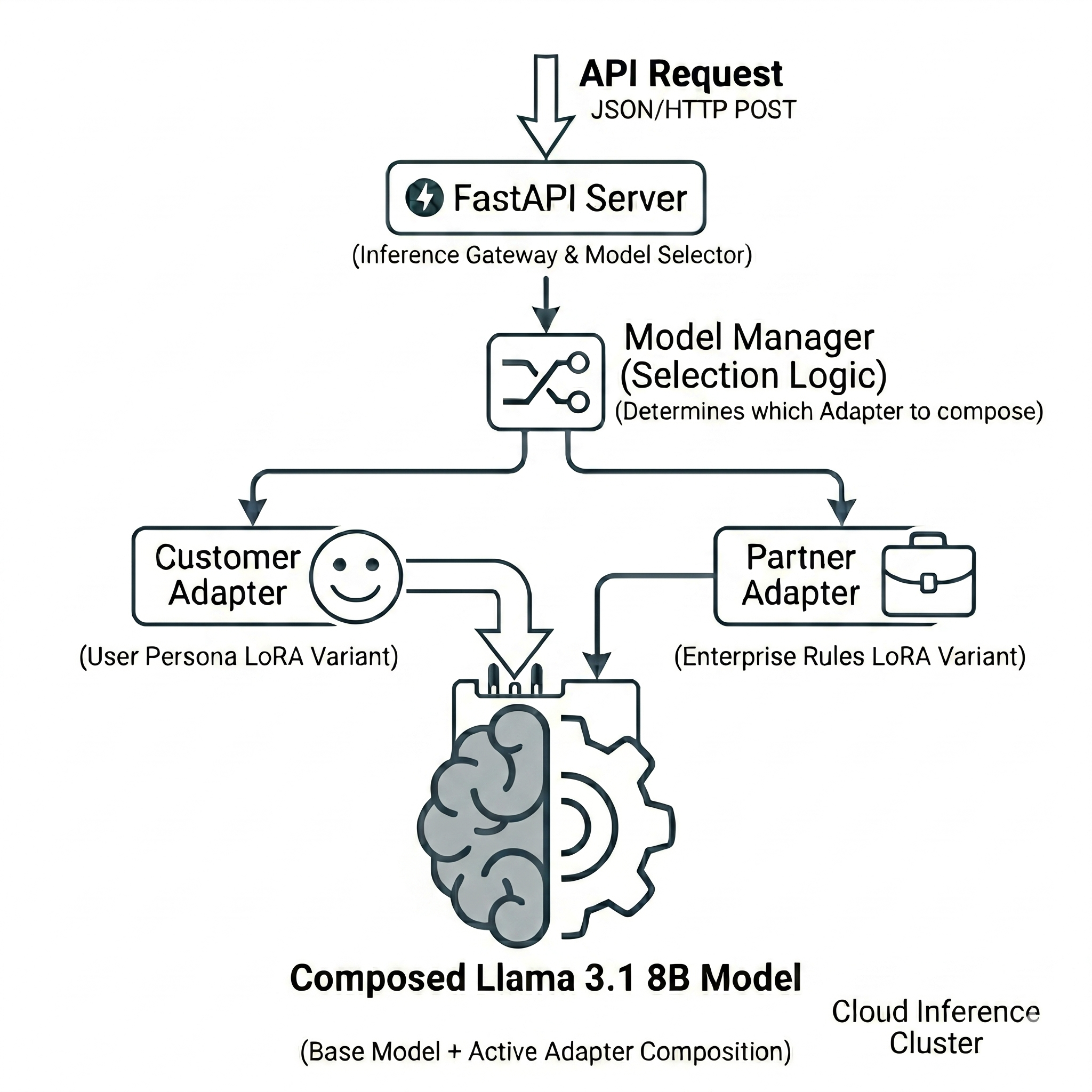
I built the Dynamic LLM Tuning Adapter to demonstrate this hot-swapping capability in a production-style FastAPI server.
The project uses Llama 3.1 8B Instruct as the frozen base model and trains two distinct LoRA adapters:
- Customer Adapter: Trained to be warm, friendly, and emoji-rich.
- Partner Adapter: Trained to be formal, professional, and SLA-aware.
1. Training the Adapters
Using the trl library (Supervised Fine-tuning Trainer) and peft (Parameter-Efficient Fine-Tuning), we train our adapters on a small JSONL dataset consisting of e-commerce queries.
For the customer adapter, a training example looks like this:
{"instruction": "What is the status of my order?", "input": "Order #12345", "output": "Hey there! 😊 I just checked on your order #12345 and great news, it's been shipped!"}
For the partner adapter, the exact same instruction looks like this:
{"instruction": "What is the status of my order?", "input": "Order #12345", "output": "Dear Partner, Thank you for your inquiry. Order #12345 has been dispatched from our fulfillment center."}
By running a simple training script, we generate two tiny adapter folders (adapters/customer/ and adapters/partner/).
2. The Model Manager (The Secret Sauce)
The core magic happens inside a thread-safe ModelManager class. On startup, the FastAPI server loads the heavy 16 GB base model into GPU (or Apple MPS) memory once.
We then use the PeftModel class from Hugging Face to wrap the base model and load our adapters:
# Conceptual flow
base_model = load("Llama-3.1-8B-Instruct")
peft_model = PeftModel(base_model, adapter="customer")
peft_model.load_adapter("partner")

# At inference time, just flip a switch:
peft_model.set_adapter("customer")  # → Warm, friendly responses
peft_model.set_adapter("partner")   # → Formal, professional responses
The set_adapter() call simply activates a different set of LoRA matrices. It doesn’t reload the 16 GB base model, making the context switch near-instantaneous.
3. Dynamic Inference via API
We expose this functionality via a POST /generate FastAPI endpoint. When a request comes in, the API reads the user_type payload and routes it to the correct adapter.
curl -X POST http://localhost:8000/generate \
  -H "Content-Type: application/json" \
  -d '{
    "prompt": "What is the status of my order #12345?",
    "user_type": "customer"
  }'
If user_type is customer, the API sets the active adapter to the customer LoRA, yielding a friendly response. If it’s partner, the API switches the adapter to the formal LoRA, yielding a professional response.
Platform Agnosticism
One of the engineering challenges I wanted to solve with this project was hardware compatibility.
By default, loading an 8B parameter model in 4-bit quantization (using bitsandbytes) is highly optimized for NVIDIA CUDA GPUs. However, if you are running this on an Apple Silicon Mac (M1/M2/M3), the PyTorch MPS backend struggles with 16-bit floats during specific attention and sampling operations, causing the generation to hang.
To counter this, the config/settings.py intelligently auto-detects the hardware. If it detects Apple Silicon with over 32 GiB of unified memory, it cleanly loads the model in float32 via MPS. If memory is tight, it falls back to a stable CPU-only float16 execution.
Conclusion
By decoupling the foundational knowledge (base model) from the behavioral nuances (LoRA adapters), we unlock a highly scalable way to serve multi-persona AI applications. You could theoretically host hundreds of distinct personas, specific client tones, or domain-specific logic on a single server without multiplying your hardware costs.
I highly recommend cloning the Dynamic LLM Tuning Adapter repository and experimenting with training your own custom LoRA personas.
Please let me know if you liked this post or if you have any questions in the comments below!